Usage › Web UI
The Web UI is a React SPA served by FastAPI. It covers the full Unit3D pre-flight workflow from the browser: library scan, guided upload, torrent queue, history, configuration, real-time logs, live integration with Unit3DWebUp. Available in Italian and English (TopBar switcher).
Start:
Open the resulting URL (http://<U3DP_HOST>:<U3DP_PORT><U3DP_ROOT_PATH>, default http://127.0.0.1:8765). Make sure Unit3DWebUp is listening at WEBUP_URL (default 127.0.0.1:8000).
Login
First screen: password field. Credentials are validated against U3DP_PASSWORD_HASH (bcrypt). The session is signed with U3DP_SECRET (itsdangerous) and lasts as long as the browser keeps the cookie.
Middleware order
Behind the scenes: SessionMiddleware must be added after the auth middleware (LIFO = last added is outermost). If you see AssertionError: SessionMiddleware must be installed, that's a bug — open an issue.
Media Library
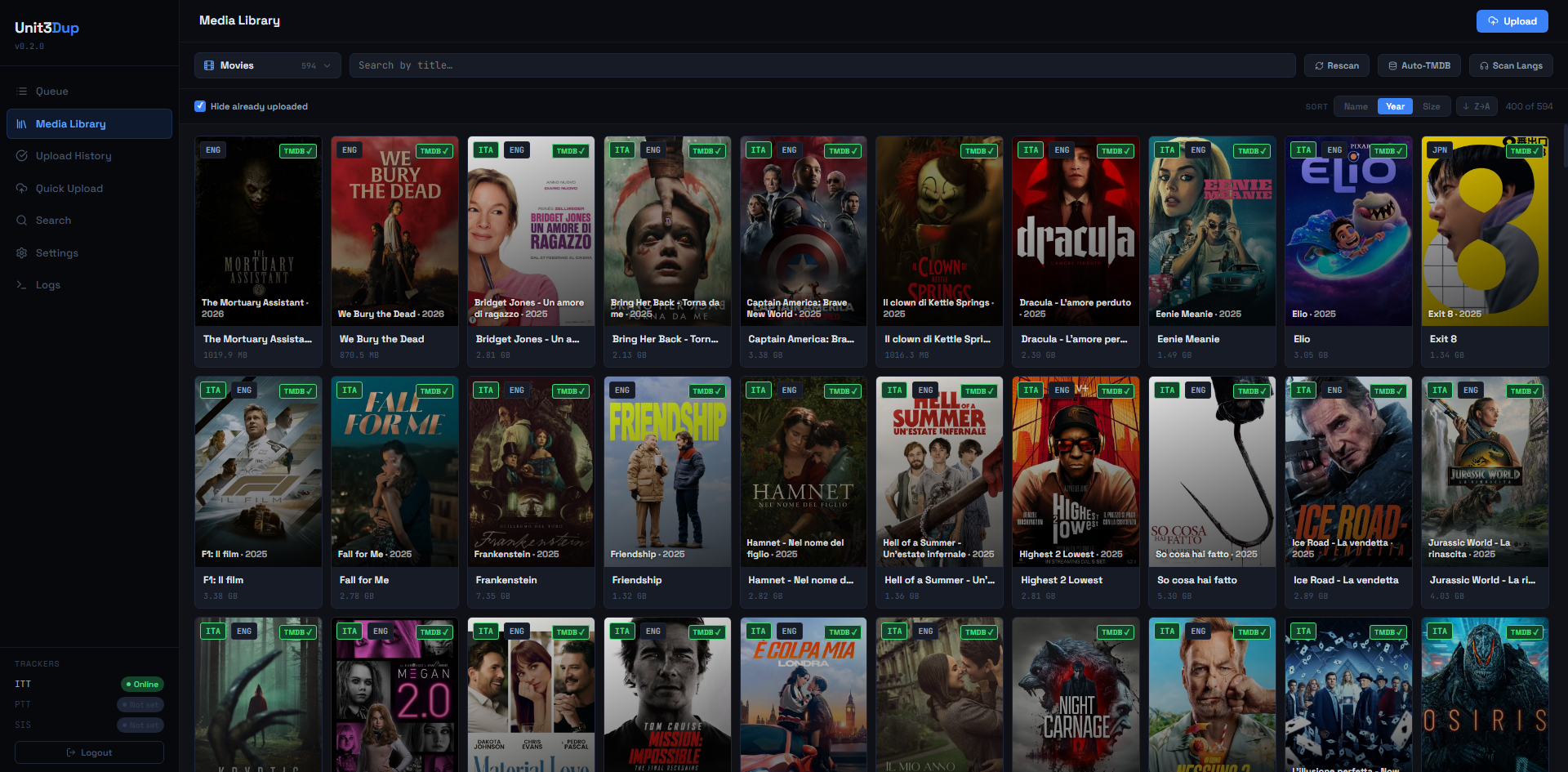
Lists categories (subfolders of U3DP_MEDIA_ROOT) and items inside them.
Features:
- Category dropdown — auto-discovered (
GET /api/library/categories). Not hardcoded. - Item list — each row shows title, year (if from TMDB), total size, detected audio languages.
- Sorting — name, year, size.
- Search — live filter on name.
- Hide uploaded — toggle controlled by
W_HIDE_UPLOADED. - Language filter — dropdown listing the languages found in the current category, split between audio and subtitles with a per-language item count; shows only media carrying the selected language. Cleared with the × or by switching category.
- Only to-check — toggle that shows only media flagged "to-check" (see below).
- Detail panel — clicking an item opens a side panel (mobile: full-screen overlay) with file list, TMDB match, actions.
- Rescan audio languages — button that streams the
pymediainfoscan via SSE, updating the cache. - Manual TMDB match — field to enter an ID, search button with result previews.
- Multi-select — checkbox on each item; action bar with "Select all", "Deselect", "Mark as uploaded" for bulk operations.
- Type filter — toggle to show only movies (
kind === 'movie'), hiding series and seasons. - Mark uploaded at every level — for series: full series, single season, single episode.
- To-check (⚑) — button to flag a media for later review (e.g. it lacks an Italian audio track). Persistent and removable with one click; available at every level (movie, episode, season, full series). Flagged media show a yellow "to check" badge and can be filtered with the Only to-check toggle. Endpoint:
POST /api/library/{category}/{item}/to-check.
Relevant endpoints: GET /api/library/categories, GET /api/library/{category}, GET /api/library/{category}/{item}, POST /api/library/{category}/{item}/langs, POST /api/tmdb/search, POST /api/tmdb/fetch.
Upload Wizard
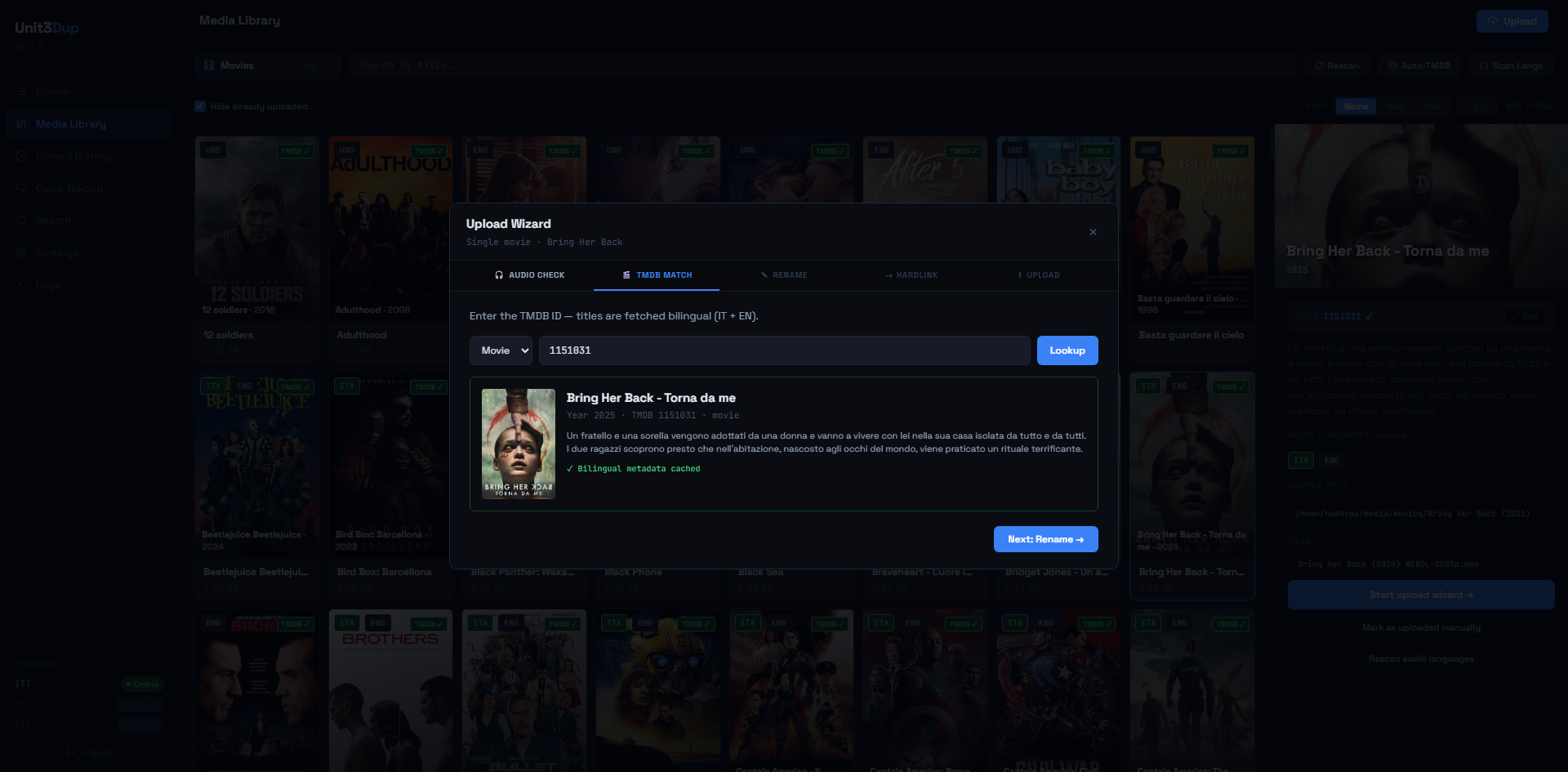
Step-by-step flow. Alternative to the CLI with persistent history, graphical progress bar and live SSE logs.
Typical steps:
- Select source — file or folder under
U3DP_MEDIA_ROOT. - Audio check — if
W_AUDIO_CHECK, scans the tracks. - TMDB — search or ID entry. If
W_AUTO_TMDB, auto-fetch from an existing ID. - Name preview — editable; if
W_CONFIRM_NAMESis OFF, skips the confirmation. - Duplicate check — if
W_DUPLICATE_CHECK(default ON), query the ITT API before hardlinking. If a torrent with the same exact byte size already exists, a yellow panel pops up (see below). Skipped for season packs. - Hardlink — into
U3DP_SEEDINGS_DIR/.unit3dprep/<jobid>/...(per-upload sandbox, see Unit3DWebUp integration). IfW_HARDLINK_ONLY, stops here and records exit code0. - Upload — the HTTP bridge runs
setenv → scan → maketorrent → upload → seedagainst Unit3DWebUp and streams logs + progress to the frontend over SSE (GET /api/wizard/{tok}/upload). Phase weights shown in the bar: setenv 3% / scan 27% / maketorrent 45% / upload 15% / seed 10%. - History write —
update_exit_code(seeding_path, code)persists intoU3DP_DB_PATH(also fromwizard_finishwhenW_HARDLINK_ONLY=1, exit code 0).
Pre-upload duplicate check
Replicates the legacy unit3dup CLI behavior: before building the .torrent, the bridge calls GET <ITT_URL>/api/torrents/filter?tmdbId=<id>&api_token=<key> and compares data[].attributes.size byte-by-byte against the local file size. Exact match → yellow panel with:
- Name, size, type/resolution, uploader, seeders/leechers, created at;
- "Open on tracker" link to the details page;
- "Upload anyway" → proceeds with hardlink + upload (useful for legitimate re-releases or alternate sources);
- "Cancel" → writes a history entry with status
⏭ duplicate skipped, hides the item from the Media Library (source_pathlands inuploaded_paths), and ends the wizard without creating any hardlink.
Webup 0.0.25 does NOT implement duplicate detection (DUPLICATE_ON/SKIP_DUPLICATE are # Todo Not yet implemented upstream): the check is performed by the unit3dprep bridge and only runs for kind=movie and kind=episode. Season packs are skipped because the pack's total byte size doesn't correspond to any single torrent on the tracker.
Best-effort: if the ITT API is unreachable or returns an error, the check is skipped silently and the upload proceeds normally. Disabled globally from Settings → Wizard defaults → Tracker duplicate check.
Quick upload
POST /api/upload/quick skips most of the wizard for power users: you get a job ID and consume GET /api/upload/{job}/stream. Use it when you already have renamed files in ~/seedings/. The flow calls stream_webup directly, no unit3dprep pre-flight.
Dry-run
When U3DP_DRY_RUN_TRACKER=1, the wizard skips /upload but runs everything else. Useful in dev/WSL.
Upload Queue
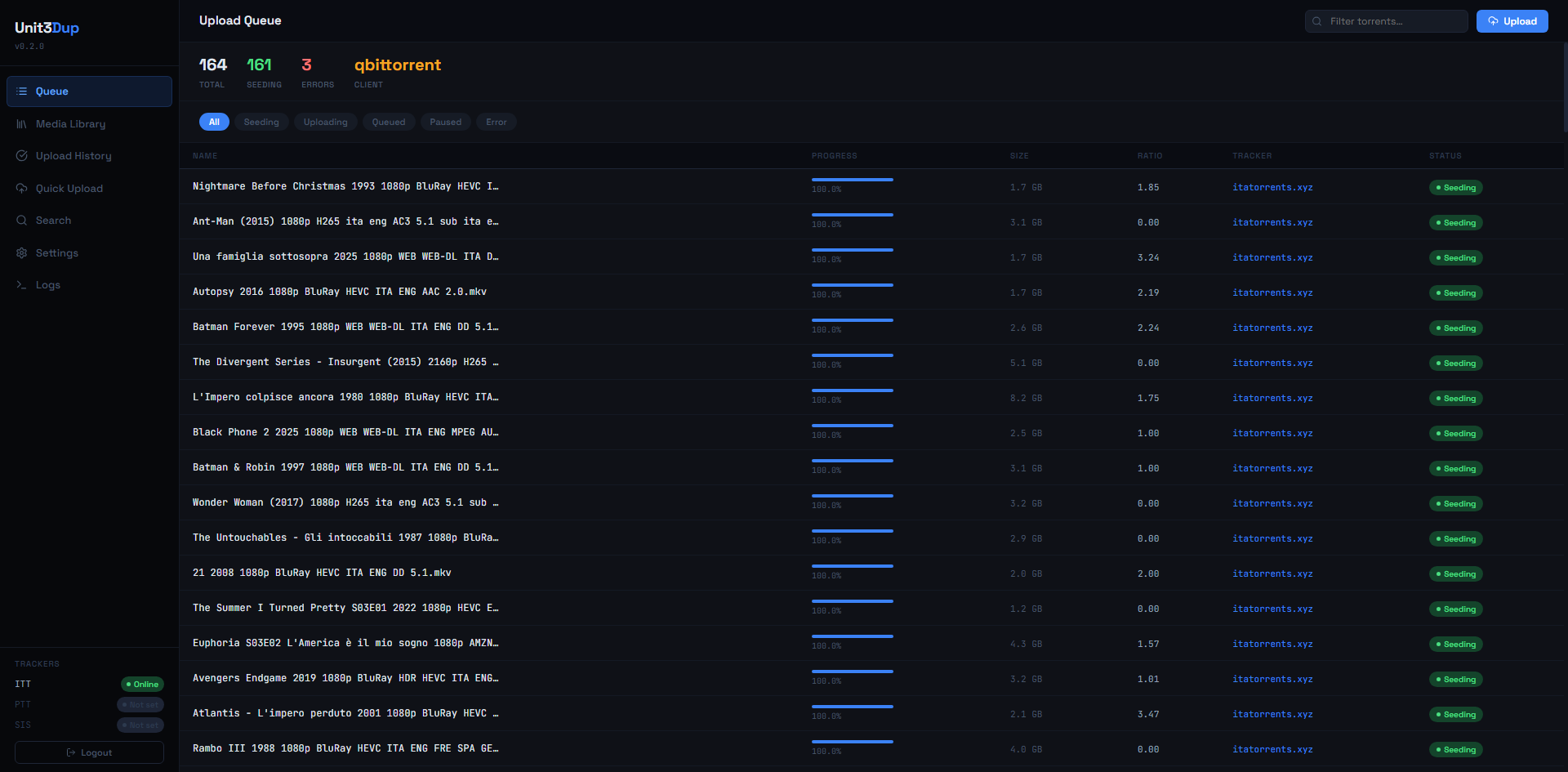
Shows active torrents in the configured client (TORRENT_CLIENT in the .env: qbittorrent, transmission, rtorrent).
- Filter by name and state (downloading, seeding, paused, error).
- Auto-refresh.
- Links to local files.
Endpoint: GET /api/queue. Client credentials read from the QBIT_* / TRASM_* / RTORR_* keys of the shared .env.
Uploaded (history)
Table of completed uploads (GET /api/uploaded). Fields:
- Local path in
~/seedings/. - Record status:
✓ exit 0— upload completed normally.✗ exit N— failed with the given code.pending— exit code never written (see note below).manual—W_HARDLINK_ONLY=1(hardlink only, no upload).⏭ duplicate skipped— the user cancelled after the duplicate check found a torrent with the same exact byte size.duplicate_info(id, name, tracker link, etc.) is persisted in the DB for audit.
- Destination tracker.
- Timestamp.
- Size.
- Search and filter.
Stat cards on top: Total, Success, Failed, Hardlink only, Duplicate skipped.
On mobile the table uses overflow-x:auto with min-width:820px to stay readable on narrow screens.
Stuck pending records
A record stuck as pending after a successful upload means the endpoint never called update_exit_code. This is a known regression trigger on changes to quickupload.py or wizard.py — see Troubleshooting.
Search Tracker
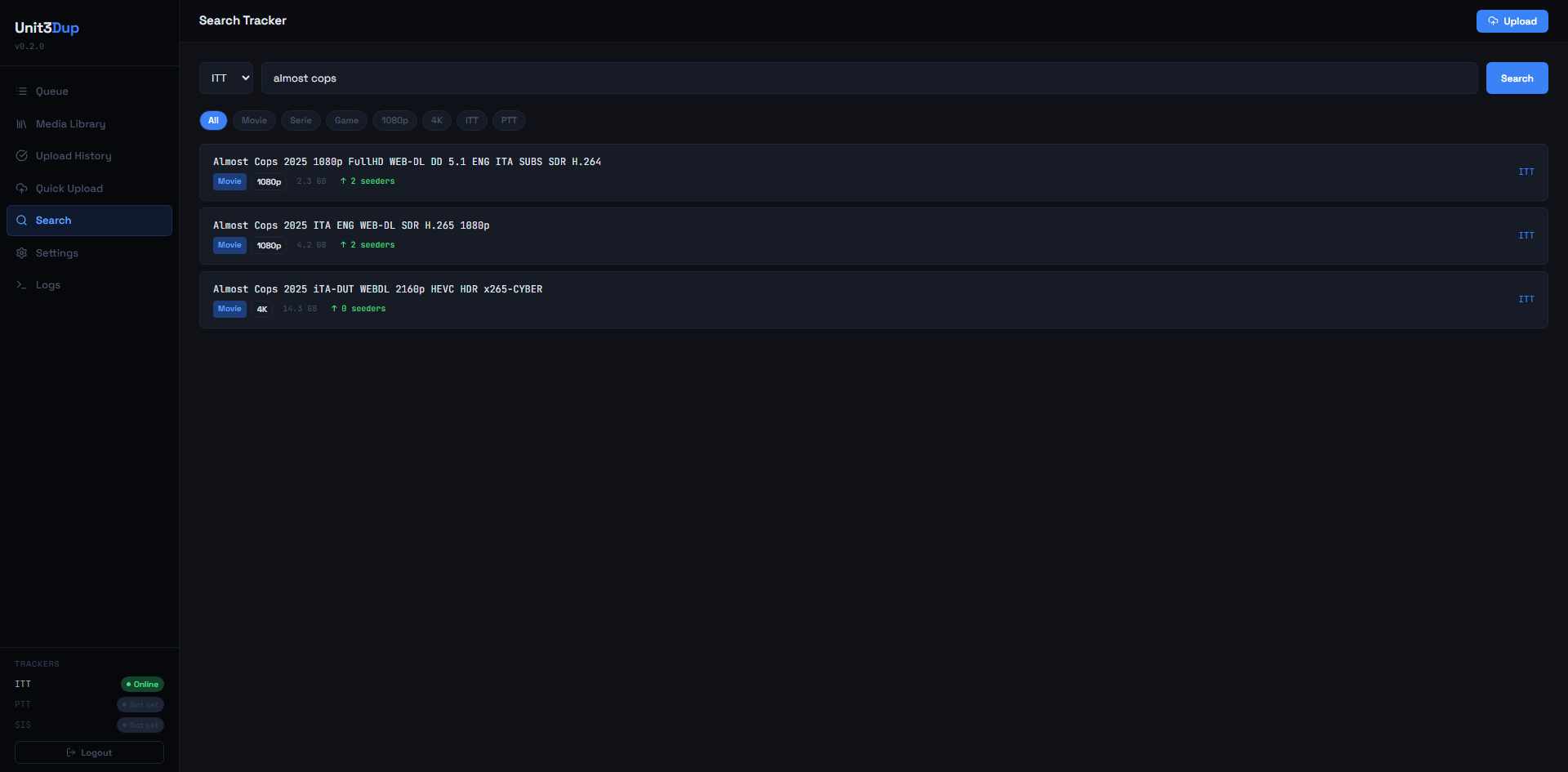
Searches for a torrent on ITT (always) and on PTT/SIS (if configured with valid URL + API key in the .env).
- Tab per tracker.
- Shows link, size, seeders, freeleech, upload date.
- Handy for duplicate checks before uploading.
Endpoint: GET /api/trackers (status) + GET /api/search?q=.... Under the hood POST /api/webup/filter proxies Unit3DWebUp /filter.
Tracker status
A tracker shows as "Online" only if URL and API key are both set and the API key is not the "no_key" placeholder. All trackers appear in the sidebar even unconfigured ones (grey "Not set" badge).
Settings
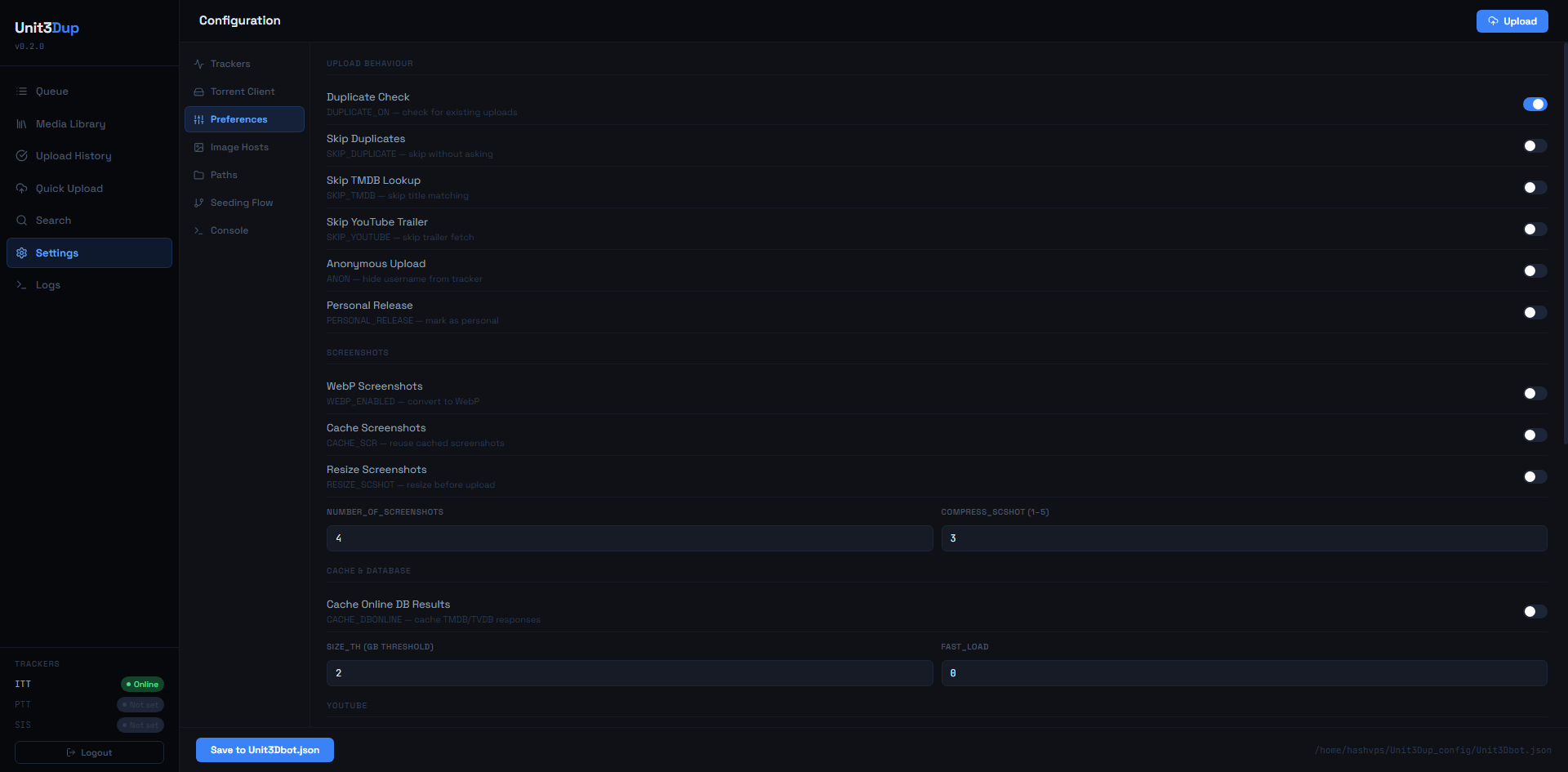
Full editor of the shared .env right in the browser. Each Save:
- atomically writes to
$ENVPATH/.env(canonical namingTRACKER__* / TORRENT__* / PREFS__*on disk); - propagates the changed keys to Unit3DWebUp via
POST /setenv(no restart required).
Sections:
- Trackers — URL, API key, PID for ITT / PTT / SIS;
MULTI_TRACKERlist. - Metadata — TMDB, TVDB, IGDB, YouTube.
- Torrent client — type + credentials (qBit / Transmission / rTorrent).
- Image hosts — preference order + API keys for PTSCREENS, PASSIMA, IMGBB, IMGFI, etc. The list order is projected to
PREFS__<HOST>_PRIORITY(1, 2, …, 99 for hosts not in the list). - Upload options —
ANON,PERSONAL_RELEASE,NUMBER_OF_SCREENSHOTS,COMPRESS_SCSHOT,TAG_ORDER_*, etc. - Seeding Flow —
U3DP_*with effective values (env vs file) viaenv_runtime().UNIT3DUP_CONFIGis read-only. - Radarr / Sonarr — URL and API key for both instances, with a connection test. See the dedicated section.
- Version — see dedicated section.
- App Auto-Update —
U3DP_SYSTEMD_UNIT, systemd user unit name used by the "Update app" button for the post-update restart. Defaultunit3dprep-web.service; override only if your unit has a different name. - Wizard Defaults — all
W_*. - Interface — language selector (IT / EN); preference saved to
localStorageand synced toU3DP_LANGviaPUT /api/settings.
Secrets masked as __SET__ — the field still appears populated. Editing other keys does not wipe secrets.
Endpoints: GET /api/settings, PUT /api/settings, GET /api/settings/fs-check.
Mobile: the left nav becomes a horizontally scrollable row; 2-col grids collapse to 1-col.
Version and auto-update
In Settings › Version you find two side-by-side cards:
- App — current version (
importlib.metadataorpyproject.tomlin git mode) vs latest GitHub release. - Unit3DWebUp — version installed in the webup venv vs latest on PyPI.
Each card exposes:
- Check updates button (force
POST /api/version/refresh— bypass the 10-min cache). - Install update button (visible only when
newer == true). - Changelog accordion with the GitHub release body (for app) or PyPI link (for webup).
Click Install:
UpdateProgressModalmodal withpip/gitoutput live-streamed via SSE (GET /api/version/update/{app|webup}/stream).- Backend invalidates
/api/version/info_cacheondone, restarts systemd in a transient scope (systemd-run --user --on-active=3s). - 5s countdown + browser reload; post-reload changelog popup (
unit3dprep.pendingChangeloglocalStorage key).
EventSource auto-reconnects
If an SSE endpoint closes the connection (e.g. after systemctl restart), the browser re-issues the request → endpoint re-execution. The modal calls closeSSE() on done/error to avoid the loop. If you modify the modal, keep this invariant.
Endpoints: GET /api/version/info, GET /api/version/changelog?v=X, GET /api/version/update/{app|webup}/stream (SSE), POST /api/version/refresh.
Unit3DWebUp health
In Settings › Trackers (or the Integrations section depending on rendering) the Unit3DWebUp card shows up:
- Status
online/offline(5s cache, ping toWEBUP_URL/setting). - Installed version.
- Ping latency in ms.
- WebSocket indicator (active connection to the bot's event channel).
- Push config button — runs
POST /api/webup/sync(push the whole.envpayload mapped to webup; useful after a backup restore or if you suspect drift). - Update button — quick link to the Version card.
Endpoints: GET /api/webup/health, POST /api/webup/sync, GET /api/webup/setting.
Logs
Real-time log stream via SSE. Anything uvicorn / the app writes to logbuf (unit3dprep/web/logbuf.py) shows up here, classified by:
- source —
app,wizard,quickupload,webup(replaces legacyunit3dup),system. - kind —
info/ok/warn/error/progress.
Filters persisted in localStorage (unit3dprep.logs.{hiddenSources,hiddenKinds,autoScroll} keys).
Useful for debugging without opening a shell on the VPS.
Mobile notes (≤768px)
The UI is responsive:
- Sidebar — closed via
translateX(-100%), scrim overlay when open. - Modal — full-bleed with 14px padding.
- Library detail —
position:fixed; inset:0overlay instead of the 360px side panel. - Settings nav — horizontal scrollable row.
- Tables —
overflow-x:auto.
Breakpoint handled by isMobile (App.tsx → Sidebar / TopBar / Library / Settings via props).
Programmatic access?
Every UI view consumes the JSON API under {U3DP_ROOT_PATH}/api/*. You can call it directly with a valid session cookie. See unit3dprep/web/api/*.py for the full list of routers (settings, version, webup, library, queue, uploaded, search, tmdb, fs).
Radarr and Sonarr
Set the URL and API key under Settings → Radarr / Sonarr and use Test connection to check them. The test queries the saved credentials, so it stays disabled while there are unsaved changes. Radarr and Sonarr must see the same filesystem as unit3dprep: library items are matched to their records by path.
With the integration on, the library shows a monitored badge on whatever Radarr or Sonarr is still searching for. The removal button appears only there:
- Movie — in the detail panel.
- Series — in the detail panel; also switches off every season and episode.
- Season — icon in the season header; also switches off its episodes.
- Episode — icon on the episode row.
Monitoring can only be removed, never re-enabled.
The series card still shows as monitored after every season is cleared
Sonarr keeps the series.monitored flag independent of the individual season
flags: if you remove monitoring season by season, the series can keep showing as
monitored even with zero active seasons left. That's correct Sonarr behaviour,
not a bug — use the series-level removal button to switch that flag off too.
To work in bulk: filter by Language, enter multi-select, pick the items and hit Stop monitoring. Items Radarr and Sonarr don't know about, or that are already unmonitored, are excluded automatically; movies go off in a single call, series run their cascade with several in parallel (bounded, so Radarr/Sonarr aren't hit with hundreds of requests at once), and a toast reports how many succeeded and how many failed.
If Radarr or Sonarr are unreachable the library keeps working as usual and a notice appears at the top: badges and buttons stay hidden until the service is back.